

Wispr Flow Review 2026: Features, Pricing, Pros & Cons – Is It Worth It?
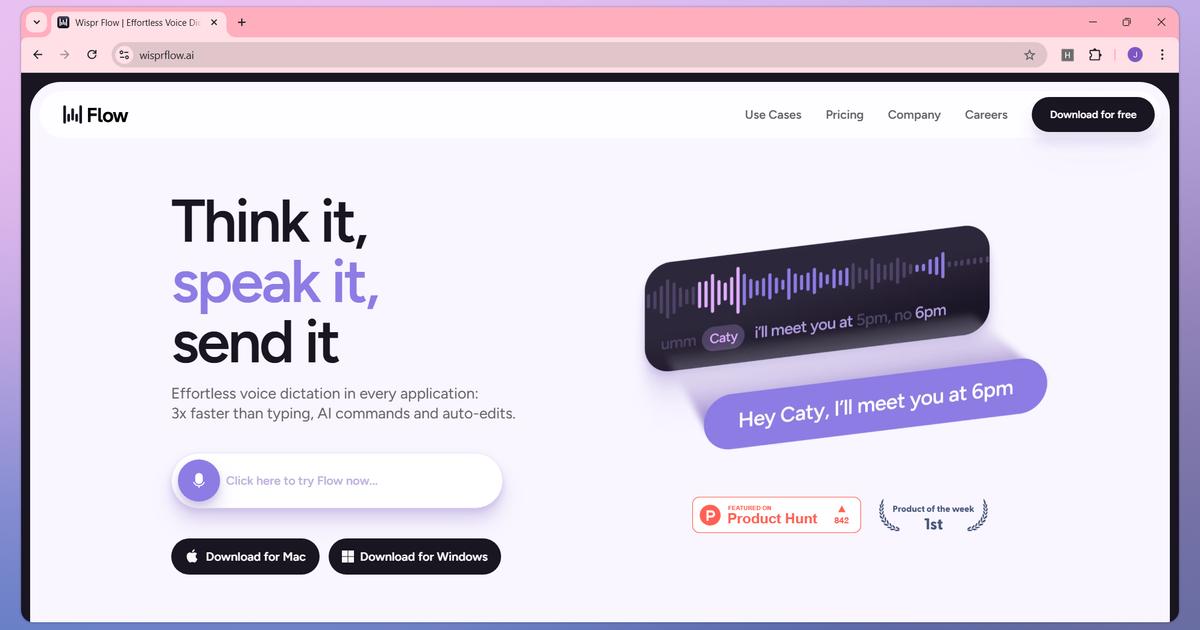
What if you could write emails, documents, messages, and social media posts simply by speaking?
For professionals who spend hours typing every day, traditional keyboards can become a productivity bottleneck. Whether you’re a content creator, entrepreneur, developer, student, or remote worker, finding a faster way to turn ideas into written text can make a meaningful difference.
That’s where Wispr Flow comes in.
Wispr Flow is an AI-powered voice dictation tool designed to turn natural speech into clear, polished text across applications.
Unlike conventional speech-to-text software, Wispr Flow uses AI to remove filler words, handle punctuation, understand corrections, and improve formatting.
But how well does it fit into a real workflow? Is the free version enough? And is Wispr Flow Pro worth paying for in 2026?
In this detailed Wispr Flow review, we’ll explore its features, pricing, benefits, limitations, and alternatives to help you decide.
Affiliate Disclosure: This article contains affiliate links. We may earn a commission if you sign up or purchase through our links, at no additional cost to you.
What Is Wispr Flow?
Wispr Flow is an AI-powered voice-to-text application that helps users write by speaking naturally.
Instead of manually typing every sentence, you can activate Wispr Flow, speak your thoughts, and have the software convert them into formatted text.
The platform works across supported applications and websites, including tools such as Gmail, Google Docs, Notion, messaging apps, and text editors.
Wispr Flow is available on:
- macOS
- Windows
- iPhone
- Android
It supports more than 100 languages and provides personalization features for names, specialized vocabulary, and frequently used phrases.
The platform also offers an AI Notetaker for capturing meetings and conversations on supported desktop devices.
Its main purpose is simple: help users spend less time typing and more time communicating, creating, and getting work done.
Wispr Flow Key Features
1. AI-Powered Voice Dictation
The core feature of Wispr Flow is its intelligent speech-to-text technology.
Instead of treating speech as a sequence of words to transcribe literally, Flow attempts to understand the intended message and produce readable text.
For example, you might say:
“Hey Sarah, um, can we move our meeting to Thursday? Actually, Friday afternoon would be better.”
Wispr Flow can remove unnecessary filler words and incorporate your spoken correction into the finished message.
This makes it especially useful for drafting emails, messages, and everyday business communications.
Why it matters: Less manual cleanup can make voice dictation more practical for regular writing tasks.
2. Automatic Punctuation and Formatting
Traditional dictation tools sometimes require users to dictate punctuation commands manually.
Wispr Flow can add punctuation and organize spoken content automatically.
It can also help format lists and other structured text.
This feature is particularly helpful when drafting longer messages, outlines, or notes.
Although automatic formatting can save time, users should still review important documents before sharing them.
3. Removes Filler Words and Self-Corrections
Natural speech often contains unnecessary phrases such as “um,” “uh,” and repeated words.
Wispr Flow is designed to clean up these elements while preserving the intended meaning.
It also recognizes certain spoken corrections.
For example, if you change a meeting time while speaking, Flow can incorporate the corrected time instead of including the entire false start.
This helps create text that feels more like a polished first draft than a raw transcript.
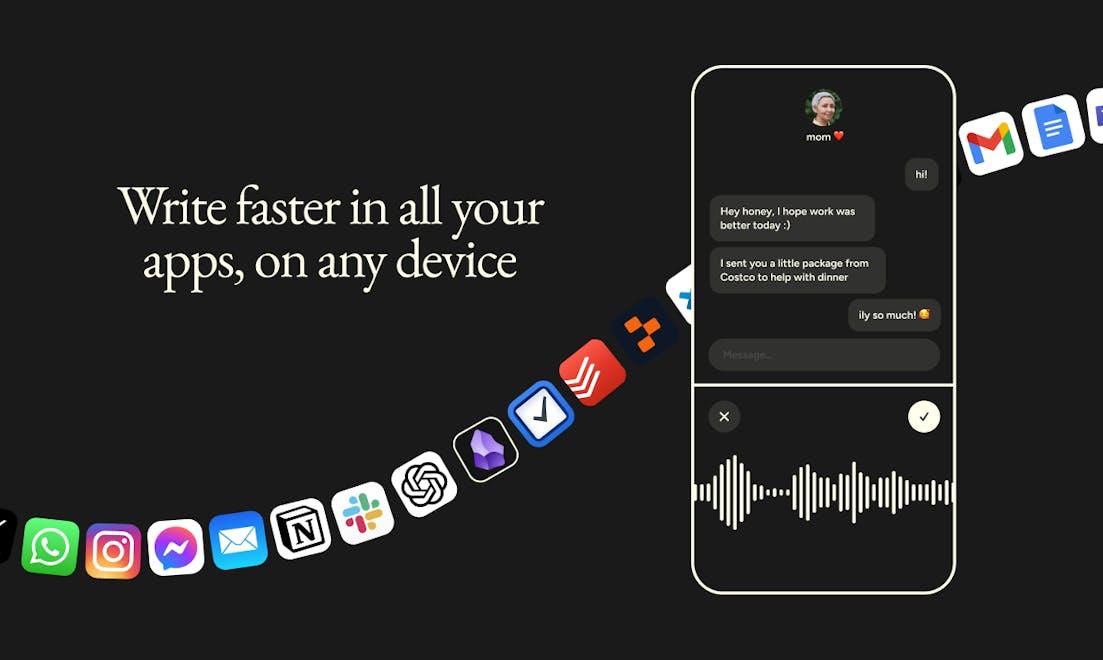
4. Works Across Multiple Applications
One of Wispr Flow’s most attractive features is its ability to work directly in supported text fields.
You can use it to create content in applications such as:
- Gmail for email communication
- Google Docs for documents
- Notion for notes and planning
- Slack for team communication
- Messaging applications
- Code editors and development tools
Rather than switching to a separate transcription website, you can dictate within your existing workflow.
Compatibility and available controls vary by operating system and application.
5. Supports More Than 100 Languages
Wispr Flow supports dictation in more than 100 languages, making it useful for international professionals and multilingual users.
This can be valuable for global teams, customer support professionals, content creators, and people who communicate across different markets.
Language selection and automatic detection options vary by platform.
Users should also note that the system generally identifies one language per dictation, rather than seamlessly recognizing every language change within a sentence.
6. Personal Dictionary
Wispr Flow includes a dictionary feature that helps recognize specialized vocabulary, names, and industry-specific terminology.
For example, a digital marketer might regularly use terms such as:
- Google Ads
- ROAS
- Conversion API
- Affiliate Marketing
- Search Engine Optimization
Adding frequently used terms to a personal dictionary can help improve the consistency of future dictations.
This feature can be especially useful for technical professionals, marketers, and business teams.
7. Voice Snippets
Wispr Flow supports snippets that allow users to insert frequently used text using spoken shortcuts.
For example, a customer support professional could create a snippet containing a standard response.
Instead of repeating the full message, they could speak the associated trigger phrase.
This can help reduce repetitive work when responding to customers or creating standard business communications.
8. AI Writing Styles
Wispr Flow provides writing-style features that can adjust the tone of dictated content.
Depending on the platform and available settings, users can tailor the output for different writing contexts.
For example, a formal business email may require a different style from a casual team message.
The Styles feature is currently associated with English-language desktop usage, so users should check availability on their device.
9. Wispr Flow AI Notetaker
Wispr Flow also offers meeting and voice-note capabilities through its Notetaker.
On supported Mac and Windows devices, the Notetaker can capture meetings, identify speakers, and help users work with meeting information.
It also supports using meeting notes with compatible AI tools.
This makes Wispr Flow relevant not only for everyday dictation but also for professionals who regularly attend meetings.
However, Notetaker availability, meeting limits, and retention depend on the subscription plan.
How Does Wispr Flow Work?
Getting started with Wispr Flow is relatively straightforward.
Step 1: Download Wispr Flow
Visit the official Wispr Flow website and choose the version for your operating system.
Step 2: Create an Account
Sign up using an available authentication method and complete the onboarding process.
Step 3: Grant Required Permissions
Wispr Flow needs microphone access to capture your speech.
Desktop installations may also request additional permissions to insert text into other applications.
Step 4: Open an Application
Open Gmail, Google Docs, Notion, or another supported application.
Place your cursor inside a text field.
Step 5: Start Dictating
Use the configured shortcut or voice input control.
Speak naturally instead of attempting to dictate every punctuation mark.
Step 6: Review Your Text
Stop dictation and allow Wispr Flow to process and insert the text.
Review the result for names, numbers, formatting, and important details before sending or publishing.
Wispr Flow Pricing in 2026
Wispr Flow offers free and paid plans for individuals and businesses.
According to its published pricing information, the main options include:
| Plan | Monthly Price | Annual Billing Equivalent |
|---|---|---|
| Free | $0 | $0 |
| Pro | $15/user/month | $12/user/month |
| Growth – Dictation | From $23/user/month | From $18/user/month |
| Growth – With unlimited Notetaker | From $33/user/month | From $26/user/month |
| Enterprise | Custom | Custom |
Prices are in USD and may vary depending on billing options, location, organizational requirements, and promotions.
Wispr Flow Free Plan
The Free plan is a good starting point for individuals who want to explore AI dictation.
Its published usage allowances include:
- 2,000 words per week on desktop
- 1,000 words per week on mobile
- Access to core voice dictation
- Support for more than 100 languages
- Dictionary and snippet capabilities
- Limited Notetaker access
The free plan does not require a credit card to get started.
Wispr Flow Pro
Wispr Flow Pro is designed for people who dictate frequently.
It includes unlimited dictation, additional Notetaker capabilities, priority support, and collaboration-related features.
At $15 per user per month, or $12 per month with annual billing, Pro may appeal to professionals who regularly write long emails, reports, documents, or content.
Wispr Flow Growth
Growth is designed for organizations that need more advanced administration, security controls, and team management.
It may be suitable for companies with formal IT and compliance requirements.
Enterprise
Enterprise provides customized arrangements for larger organizations with advanced deployment, security, and support needs.
Businesses should contact the provider for a tailored quote.
Compare Wispr Flow Plans and Get Started
Wispr Flow Pros and Cons
Pros
Natural voice dictation
The platform is designed to turn conversational speech into more polished written text.
Automatic cleanup
Filler-word removal, punctuation, and self-correction handling can reduce manual editing.
Cross-platform availability
Wispr Flow supports Mac, Windows, iPhone, and Android.
Multilingual support
More than 100 supported languages make it relevant for international users.
Personalization features
Dictionary entries, snippets, and supported writing styles help tailor the experience.
Free plan available
Users can explore the software before purchasing a subscription.
Additional meeting tools
The Notetaker expands its usefulness beyond basic speech-to-text.
Cons
Requires an internet connection
Voice transcription depends on online processing.
Free plan has usage limits
Heavy users may reach the weekly word allowance quickly.
Not every device is supported
Some platforms, including Linux and iPad, are not officially supported.
Output still needs review
Names, numbers, technical terminology, and formatting may occasionally require corrections.
Privacy considerations
Users should review microphone permissions, data storage settings, and organizational policies before dictating sensitive information.
Advanced plans cost more
Business administration and expanded Notetaker capabilities may require more expensive subscriptions.
Who Should Use Wispr Flow?
Content Creators and Bloggers
Bloggers can use Wispr Flow to dictate outlines, article drafts, and content ideas.
It may be particularly helpful for capturing thoughts quickly before refining them into publishable content.
Digital Marketers
Marketing professionals often write advertising copy, campaign notes, emails, and creative briefs.
Wispr Flow can assist with the drafting process, allowing marketers to communicate ideas without typing every sentence manually.
Entrepreneurs and Business Owners
Business owners can use voice dictation for daily correspondence, internal updates, and planning documents.
Students and Educators
Students may use dictation to capture ideas and create study notes.
Eligible students may also qualify for special educational access or pricing.
Developers
Developers can use voice dictation for documentation, technical explanations, messages, and project notes.
However, code-specific formatting may still require manual input.
Remote Workers
Professionals who communicate through Slack, email, and online documents may benefit from voice-first writing workflows.
Wispr Flow vs Traditional Voice Typing
How does Wispr Flow compare with basic speech-to-text tools?
| Feature | Wispr Flow | Basic Voice Typing |
|---|---|---|
| Speech-to-text | Yes | Yes |
| AI cleanup | Yes | Varies |
| Filler-word removal | Yes | Varies |
| Spoken corrections | Supported | Varies |
| Personal dictionary | Yes | Depends on tool |
| Cross-app dictation | Supported | Platform-dependent |
| AI meeting notes | Available | Usually separate |
The main distinction is that Wispr Flow focuses on transforming speech into polished writing rather than simply recording every spoken word.
However, users who only need occasional dictation may find built-in operating-system tools sufficient.
Wispr Flow vs Otter.ai
Wispr Flow and Otter.ai both use speech recognition, but their primary purposes are different.
Wispr Flow focuses on everyday voice dictation and writing directly inside applications.
Otter.ai is primarily associated with meeting transcription, summaries, and collaboration.
Although Wispr Flow now includes meeting-note capabilities, users should compare their specific requirements before choosing between the two.
Choose Wispr Flow if: Your main priority is writing emails, documents, messages, and other content through voice dictation.
Consider Otter.ai if: Your primary workflow revolves around meeting transcripts and meeting-focused collaboration.
Is Wispr Flow Worth It in 2026?
Wispr Flow is worth considering if typing takes up a significant portion of your working day.
Its most compelling features include natural dictation, automatic cleanup, support for multiple languages, and integration with existing writing workflows.
For occasional users, the free plan may be sufficient.
For professionals who dictate large amounts of text, Pro offers unlimited dictation at a predictable subscription price.
However, the platform is not necessarily the best choice for everyone.
People who prefer typing, work primarily offline, or only need occasional voice input may not benefit enough to justify a paid subscription.
The best approach is to test Wispr Flow with your actual daily tasks before upgrading.
Frequently Asked Questions
Is Wispr Flow free?
Yes. Wispr Flow offers a free plan with weekly dictation limits. No credit card is required to begin using the free tier.
How much does Wispr Flow Pro cost?
The published price is $15 per user per month, or $12 per user per month with annual billing.
Does Wispr Flow work on Windows?
Yes. Wispr Flow supports Windows 10 and Windows 11 on compatible devices.
Can I use Wispr Flow on iPhone?
Yes. Wispr Flow provides an iPhone application with a dedicated voice dictation keyboard.
Does Wispr Flow support Android?
Yes. Wispr Flow supports compatible Android smartphones.
Does Wispr Flow support multiple languages?
Yes. It supports dictation in more than 100 languages.
Can Wispr Flow replace typing?
For many everyday writing tasks, it can reduce the amount of typing required. However, manual editing and keyboard input may still be necessary.
Is Wispr Flow suitable for business use?
Yes. Wispr Flow offers individual, team, and enterprise-oriented plans with different administration and security capabilities.
Does Wispr Flow work offline?
Voice transcription requires an internet connection, so it is not a fully offline dictation solution.
Can I cancel Wispr Flow Pro?
According to the provider, users can manage and cancel their subscriptions through the application’s billing settings.
Final Verdict: Should You Try Wispr Flow?
Wispr Flow is a compelling AI productivity tool for people who want to write more efficiently using their voice.
Its combination of natural speech recognition, intelligent text cleanup, multilingual support, and cross-application dictation makes it an interesting alternative to conventional voice typing.
The free plan offers an accessible way to explore its capabilities, while Pro is aimed at users who regularly rely on dictation.
For professionals, creators, marketers, and entrepreneurs who spend significant time writing, Wispr Flow is worth testing.
The most important question is whether voice dictation fits naturally into your workflow.
Ready to spend less time typing and more time creating?
Published by InsignReview — Independent software reviews, AI tools, and productivity technology insights.
Editorial Note: This review is based on publicly available product information and documentation, not an independently verified hands-on test. Features, availability, and pricing may change.