

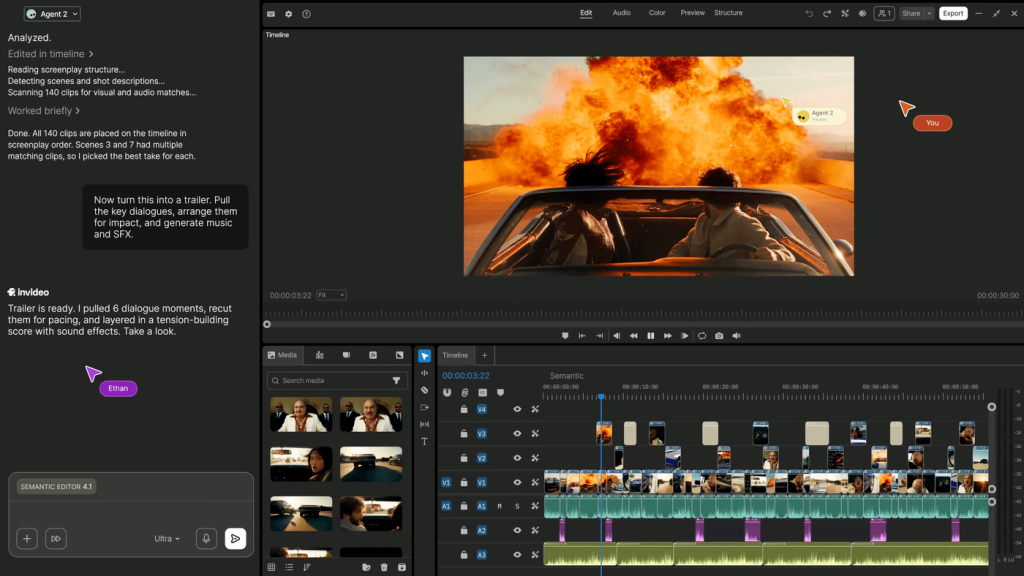
InVideo’s current site emphasizes AI-assisted video editing on a multitrack timeline. It presents a workflow of uploading footage, describing an edit, reviewing the cut and exporting. This InVideo review examines that approach and the checks that determine whether the result is useful.
We have not benchmarked editing accuracy, generation quality, render speed or export reliability.
Explore InVideo and check current availability →
What the platform presents
The official page highlights footage search, applying changes across shots, storyboarding, script writing, collaboration and timeline editing. It also promotes generative models and agents. Availability and allowances can vary by plan and tool, so compare the actual workflow you need rather than assuming every homepage demonstration is included.
Use a representative editing pilot
Start with a short project containing the kinds of footage, dialogue and branding you normally use. Ask for a specific edit and inspect every affected section. Check that the chosen shots tell the intended story, the audio remains intelligible and important information has not been removed.
A plain-language instruction can save manual work, but it can also be interpreted differently from what you meant. Review the timeline rather than approving only a quick preview. Keep original media and a recoverable project version before broad edits. We have not tested how reliably the system preserves continuity or applies changes across a large project.
Export quality is the useful result
Check aspect ratio, resolution, captions, branding, audio levels and any watermark. View the exported file on the destination device. For generated content, inspect text, faces, hands, product details and factual claims. A polished sequence can still contain an inaccurate depiction or an image that does not match the advertised product.
Pros and trade-offs
- Workflow: AI assistance and manual timeline control are presented together.
- Collaboration: shared editing may help coordinated teams.
- Trade-off: generated and automated changes still need close review.
- Limit: demonstrations do not establish reliability on your own material.
Credits, permissions and billing
Model a typical month’s projects against the plan’s seats, credits, generation costs and export allowances. A time-limited unlimited promotion may have conditions different from the ongoing subscription. Check renewal and cancellation. Use footage, music, voices and likenesses you have permission to use, and review data handling before uploading confidential client material.
FAQ
Can an editing instruction be accepted without reviewing the result?
Review the changed timeline and export before publication.
Does a high credit allowance guarantee enough finished videos?
Costs depend on tools, attempts and project requirements; calculate a representative workflow.
Verdict
InVideo is worth piloting when AI assistance could reduce repeated editing work while preserving the control you need. Evaluate one complete project, including revisions and export, and compare its real resource use with the subscription. Finished accuracy matters more than first-draft speed.
Explore InVideo and check current availability →
Sources and review approach
This is an editorial review of published product information, not a hands-on performance test. Sources were consulted on 23 October 2026.